
The Outage Was the Lure: Microsoft 365 Went Down, and the Phishing Was Ready by Morning
Microsoft 365 was down for nearly a day. By morning, a phishing campaign was posing as the all-clear. How outage lures work and how to prepare your people.
On Thursday, November 12, Microsoft 365 failed for just under a day. Mailboxes were unreachable, Teams faltered, and a lot of people spent the afternoon refreshing Outlook and apologizing to customers by phone.
On Friday, inboxes started coming back. Waiting in some of them was the message everyone wanted to see: a service notice saying a handful of emails had been held during the outage and could be restored with one click. The notice added that anything left unrestored would be deleted in 24 hours.
Microsoft did not send it. Whoever did had read the same headlines as everyone else and moved fast.
What happened
All times Eastern. Microsoft's figures come from its preliminary incident review, so treat them as provisional.
| When | What |
|---|---|
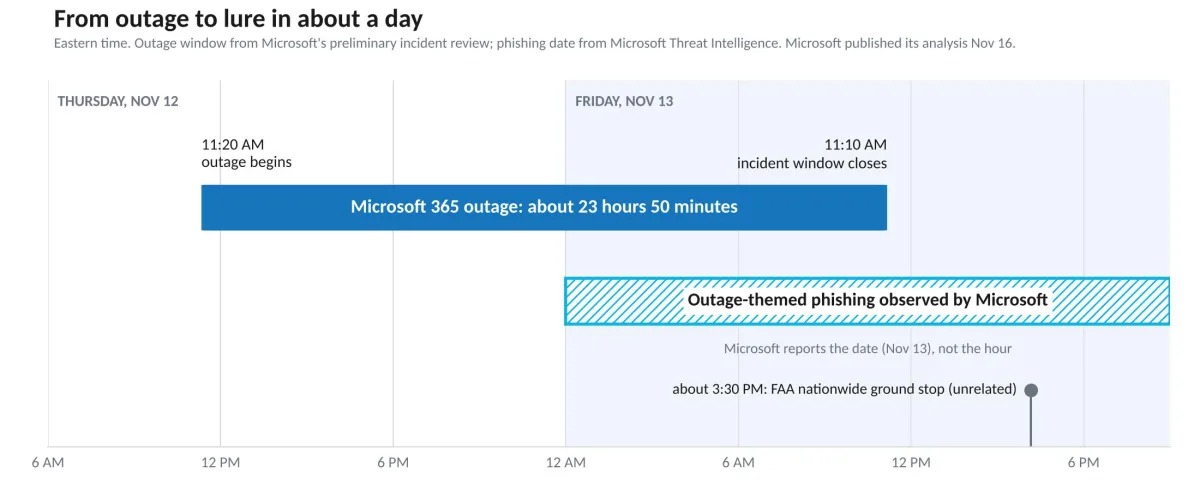
| Thu, Nov 12, about 11:20 AM | The outage begins. Exchange Online is hit hardest, and most people cannot reach their mailboxes through Outlook or any other mail client. |
| Thu, Nov 12, afternoon | Microsoft widens the incident to cover Microsoft 365 services worldwide, including Teams, SharePoint and Copilot. |
| Fri, Nov 13 | Microsoft Threat Intelligence observes a coordinated, high-volume phishing campaign that uses the outage as its pretext. |
| Fri, Nov 13, about 11:10 AM | The incident window closes, roughly 23 hours and 50 minutes after it opened. |
| Fri, Nov 13, about 3:30 PM | Unrelated, but the same day: an FAA technical problem leads to a nationwide ground stop. |
| Mon, Nov 16 | Microsoft publishes its analysis of the phishing campaign. |
Microsoft has been clear that the outage itself was a technical failure, not a cyberattack and not something caused by AI. Its preliminary review describes a software defect in the network gateway that sits in front of many Microsoft 365 services, pushed past its limit by extra traffic at a moment when some capacity was already offline.
In other words, nobody broke into Microsoft. The people behind the phishing only had to follow the news.
Anatomy of the lure
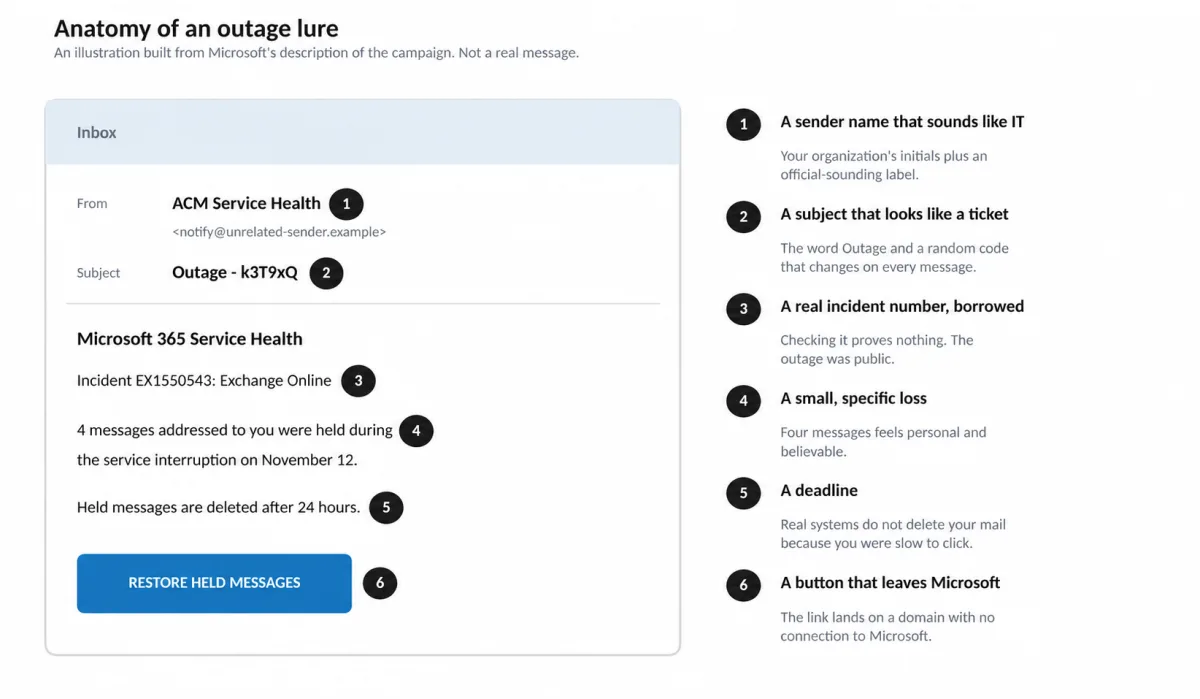
According to Microsoft's write-up, the messages were built to look like Microsoft 365 service health notices. The reconstruction above is our own illustration, drawn from that description, and does not reproduce a real message. The tells:
- A sender name that sounds like your IT department. This is display name spoofing. The display name paired a short, organization-style prefix with an official-sounding label such as an outage notification or a service health alert.
- A subject line that looks like a ticket. The word "Outage" followed by a random six-character code. The code changes on every message, which helps the email slip past filters and makes it feel like a tracked incident.
- A real incident, borrowed. SecurityWeek reports that the emails referenced Microsoft's actual Exchange Online incident number. Anyone who checked the number would have found it was genuine.
- A small, specific loss. The notice said four messages were being held. A small, exact number is easier to believe than a vague warning about your account.
- A deadline. Restore them within 24 hours or they are deleted.
- A button that leaves Microsoft. The link ran through a per-recipient tracking address and landed on a domain with no connection to Microsoft.
There was also something the reader never saw: a block of fake email conversation tucked into the message body, apparently there to help the message get past automated filtering.
Some limits on what is known: Microsoft called the campaign high-volume but did not publish a message count. It assessed the goal as credential theft but did not observe credentials actually being entered. It has not tied the campaign to a named group, and it says its own mail security was blocking and quarantining the messages. No breach has been confirmed. What stands out is how quickly a believable lure appeared.
What KillPhish AI made of it
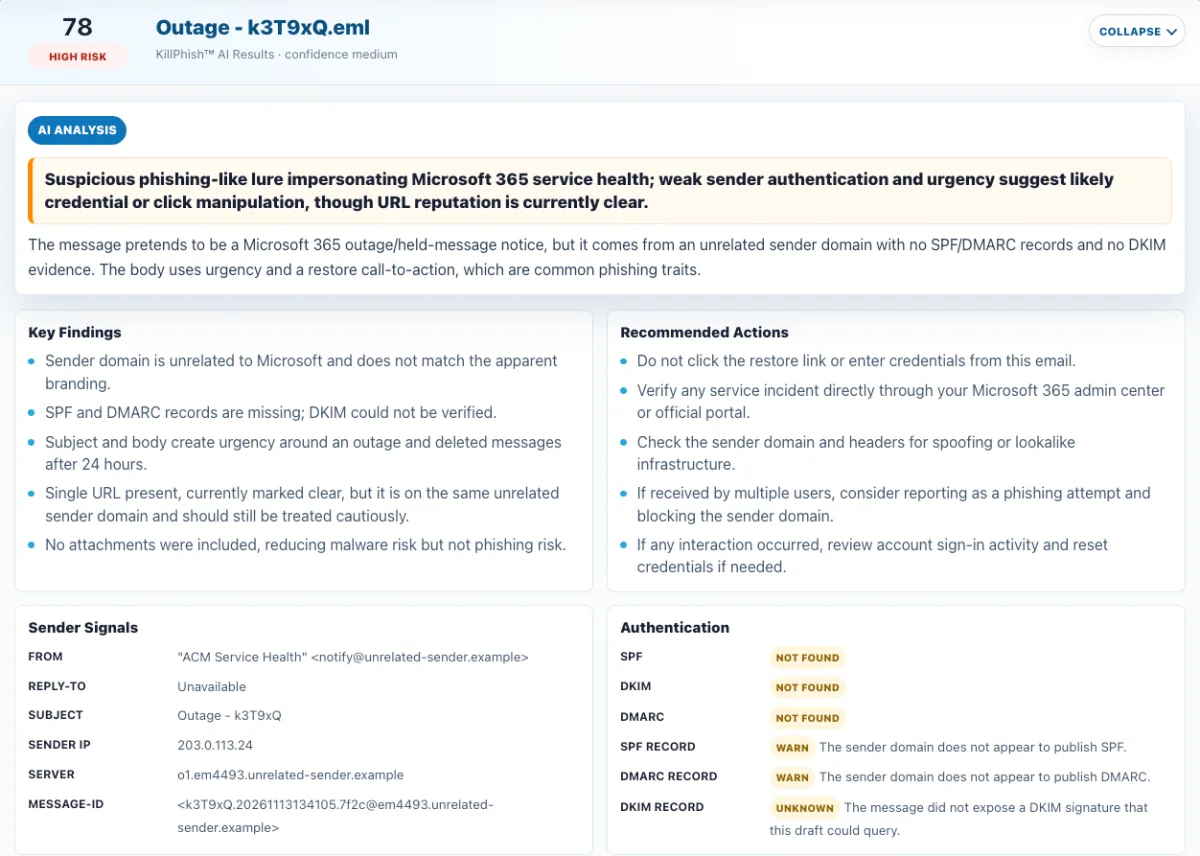
We saved our reconstruction as an email file and uploaded it to the free Email Analyzer, which runs KillPhish AI. It scored the message 78, High Risk, within a few seconds. The analysis picked out what a careful reader would: a sender domain unrelated to Microsoft, no SPF or DMARC records, and urgency built around deleted messages. It also reported that the link had no match in its reputation database.
That last finding is worth a second look. A new lure usually points at a domain nobody has reported yet, so a link check alone would have let it through.
Why it worked: the event did the persuading
Most phishing has to invent a reason for you to act, such as an unpaid invoice you do not remember or a package you did not order. Security teams call that invented story a pretext. People catch it because the story does not match their day.
This one matched. There really had been an outage, and every recipient had lived through it. After a day without email, a note from IT or Microsoft about what happens next was exactly what people expected. The message asked for nothing and offered to give mail back. It also landed as service returned, when people were working through a backlog and clicking quickly.
That is a problem for awareness programs built on spotting what looks strange, because nothing here looked strange. A better habit is to check the channel. News about a service comes from that service's own status page, and a link somebody sent you is no substitute.
The news cycle is the attacker's content calendar
Attackers have done this before. When a faulty CrowdStrike update took down Windows machines worldwide in July 2024, CISA's alert the same day noted that threat actors were already using the incident for phishing. Microsoft makes the same point about this month's campaign: attackers reliably watch for major public events and borrow them.
Consider what else happened in the same 48 hours. On Friday afternoon an FAA technical problem grounded flights nationwide, and by the agency's count operators canceled more than 12,000 flights in the aftermath. We have not seen a specific scam tied to the ground stop. Still, every stranded traveler spent the weekend expecting a rebooking or refund message, and that kind of expectation is what the Microsoft lure relied on.
Black Friday is November 27. Year-end benefits, tax forms and bonus notices follow. You cannot predict the next outage, but you can predict the shape of the email that will follow it: a real event, an expected sender, a deadline and a link.
The second wave is a message from "IT"
One more risk is worth planning for now.
After an outage, employees expect the help desk to reach out. That expectation is valuable to an attacker. In a report this September, Microsoft described intruders who message or call an employee on Microsoft Teams from an outside account, pose as the company's own IT support, and talk the user into opening Quick Assist and handing over control of the machine. From there they worked toward domain controllers.
An earlier Microsoft report describes one group flooding a victim's inbox first, then posing as tech support and offering to fix the junk mail problem it had caused. An outage creates the problem for free. "We're repairing mailboxes affected by Thursday's outage, can I connect to your machine for a minute?" is a sentence your people should already know how to answer.
What to do this week
If you run security or IT:
- Hunt for it. Search mail logs for the sender patterns, the "Outage" plus code subject line and the destination domains Microsoft published. Remove delivered copies.
- Find the clicks. Identify anyone who followed the link. For anyone who may have entered a password, reset it, revoke active sessions, and review MFA registrations, inbox and forwarding rules, and app consents.
- Tell people where status lives. One short message: service status for our email comes from this page and this channel. It never arrives as a button in your inbox.
- Write the outage comms plan now. Decide which channel is official when email is down, and tell employees before you need it. The gap in official communication is the space the lure fills.
- Give the help desk a callback rule. IT never asks for remote access on an inbound message or call. Employees verify through the number or ticket system they already know.
- Limit external Teams contact to the partners who need it, and label outside senders.
- Move toward phishing-resistant sign-in, such as passkeys or security keys, starting with administrators. Not all multi-factor authentication resists phishing.
If you manage people:
Say it out loud in Monday's meeting. It takes thirty seconds and it is the one control in this list that costs nothing.
The rule your users need
Status comes from the status page. Never from your inbox.
If a message says a service was down and asks you to click to fix, restore or confirm anything, close it and go to the source yourself.
A deadline is a tell. Real systems do not delete your mail because you were slow to click.
Where PhishingBox fits
Nothing PhishingBox makes would have kept Microsoft 365 online, and for many organizations the mail filter stopped this campaign before anyone saw it.
Our part is the person who does see the next one, at 8:40 on a Friday morning with a full inbox and a customer waiting.
- Phishing Simulations. Run the outage pretext yourself, this week, while the memory is fresh: a simulated service notice, a held-messages claim, a deadline. You will see who clicks and who goes on to enter a password.
- Security Awareness Training. Follow the simulation with a short training moment for the people who needed it, instead of a once-a-year course for everyone.
- KillPhish AI. Give employees a one-click way to report a suspicious message from Outlook, with AI-assisted analysis, so the first person who sees the lure protects the next hundred.
- Human Risk Management. Track how risk changes over time, so you know whether the lesson held when the next event arrives.
- Callback Phishing. For the phone and help desk angle, send a simulated phishing email that carries a phone number and PIN, and see who dials in and enters the code.
More than 4 million users train on PhishingBox. See. Score. Secure.
Have a message you are not sure about? Upload it to the free Email Analyzer for a KillPhish AI risk score and a plain-language explanation. To see how you would do against a realistic lure, take the phishing test.
See how real phishing simulations uncover risky behavior. Request a demo or start a 14-day free trial. No credit card required.
Related reading from PhishingBox: Device code phishing and the MFA bypass and The phone call that beats your passkey.
Frequently asked questions
What is outage phishing?
Outage phishing is a phishing email that uses a real, public service outage as its cover story. The sender poses as the provider or your IT team and offers a fix, a refund or "held" messages. Because the outage really happened, the message feels expected.
Did attackers cause the November 2026 Microsoft 365 outage?
No. Microsoft says the outage was a technical failure and not a cyberattack. The phishing came afterward, from people using the news as cover.
How quickly did phishing follow the Microsoft 365 outage?
Within about a day. The outage began on November 12, 2026, and Microsoft Threat Intelligence observed a coordinated, high-volume phishing campaign using it as a lure on November 13.
How can employees tell a real service notice from a fake one?
Check the channel. Real service status lives on the provider's status page or admin center. A message that asks you to click to restore, fix or confirm something, especially with a deadline, should be reported and left alone.
What should I do if I clicked the "restore messages" link?
Tell your IT or security team right away. If you entered a password, it should be reset and your active sessions revoked. The team should also review MFA registrations, mailbox rules and app consents on the account.
How can I check whether an email is phishing?
Do not click its links. Report it with your company's report button, or upload the message to the free PhishingBox Email Analyzer. It checks the sender, SPF, DKIM, DMARC and links, then returns a risk score with a plain-language explanation.
Sources
- Microsoft Threat Intelligence, "High volume phishing campaign uses Microsoft 365 outage lures to target multiple industry sectors," November 16, 2026. https://www.microsoft.com/en-us/security/blog/2026/11/16/high-volume-phishing-campaign-uses-microsoft-365-outage-lures-target-multiple-industry-sectors-2/
- SecurityWeek, "Microsoft Rules Out Cyberattack in Outage, Warns of Phishing Campaign," November 16, 2026. https://www.securityweek.com/microsoft-rules-out-cyberattack-in-outage-warns-of-phishing-campaign/
- Office Watch, "Microsoft 365 outage: what went wrong, in plain English" (reproduces Microsoft's preliminary post-incident review dated November 15, 2026). https://office-watch.com/?p=78199
- BleepingComputer, "Massive Microsoft 365 outage disrupts Outlook, Teams, Copilot worldwide," November 12, 2026. https://bleepingcomputer.com/news/microsoft/massive-microsoft-365-outage-disrupts-outlook-teams-copilot-worldwide
- CISA, "Widespread IT Outage Due to CrowdStrike Update," July 19, 2024. https://www.cisa.gov/news-events/alerts/2024/07/19/widespread-it-outage-due-crowdstrike-update
- Microsoft Security Research, "Impersonating IT support: how threat actors turn a remote session into enterprise-wide access," September 2, 2026. https://www.microsoft.com/en-us/security/blog/2026/09/02/impersonating-it-support-threat-actors-turn-remote-session-into-enterprise-wide-access/
- Microsoft Threat Intelligence, "Disrupting threats targeting Microsoft Teams," October 7, 2025. https://www.microsoft.com/en-us/security/blog/2025/10/07/disrupting-threats-targeting-microsoft-teams/
- FAA, "Nationwide Ground Stop: Questions and Answers," November 15, 2026. https://www.faa.gov/newsroom/nationwide-ground-stop-questions-and-answers