
The Phone Call That Beats Your Passkey
Passkeys are phishing-resistant at sign-in, but not at enrollment. See how the Pink vishing campaign hijacks Microsoft Entra passkey registration and...
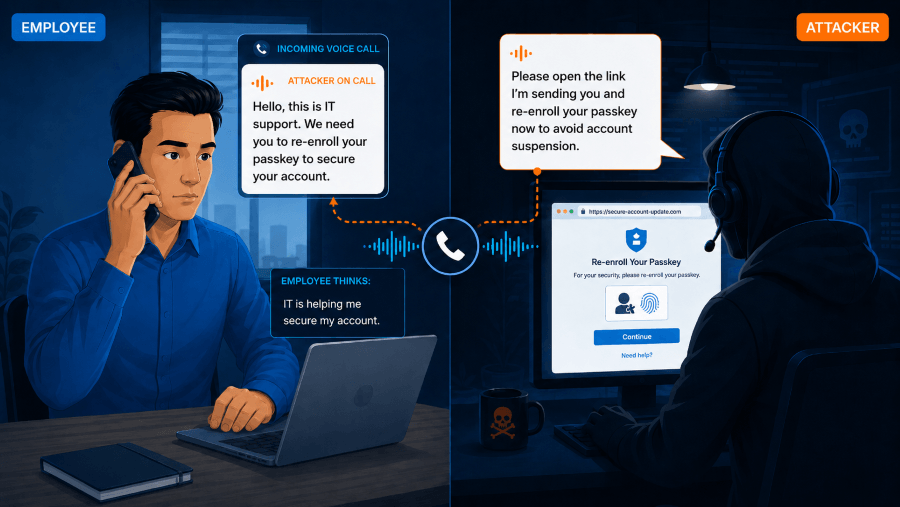
Your passkey rollout is going well. Employees are enrolling. The nudges are working. Somewhere, an attacker is reading the same announcement, because it is their script.
Since April 2026, a threat group tracked by Okta Threat Intelligence as O-UNC-066, better known by its extortion brand Pink, has been proving an uncomfortable point: the industry's most phishing-resistant credential can be defeated at its least resistant moment. Not the login. The enrollment.
The attack, step by step
Pink's operators phone employees at targeted companies, pose as IT support, and deliver a simple message: you need to register a new passkey. Victims are directed to per-company subdomains on lookalike domains such as setpasskey[.]com and passkeydeploy[.]com, with pages dressed in the victim organization's logo and branding and Microsoft's genuine styling loaded from Microsoft's CDN.
What sits behind those pages is not the usual automated phishing proxy. It is an operator-controlled panel with a one-second heartbeat: a live human being on the other end who watches the victim's progress and changes the page in real time. Password challenge first. Then whatever MFA the account actually uses, including an authenticator code, a push notification with number matching, or an SMS code. The operator adapts the flow on the fly, entering everything the victim surrenders into the real Microsoft login.
Then comes the sleight of hand. The victim is walked through a theatrical passkey enrollment, including a Microsoft-branded page asking them to save a recovery seed phrase. Okta notes that this seed phrase has no role in real Entra passkey registration. It exists to keep the victim busy and believing. While they write down meaningless words, the attacker enrolls their own passkey in the victim's real Microsoft 365 account.
The finishing touch is cruel in its elegance: Microsoft's legitimate new-passkey notification arrives and confirms exactly what the victim already believes. They think they did it. The attacker even gets to name the passkey something reassuring.
-
1
The call
Fake IT support phones the employee and says they must register a new passkey.
-
2
The fake page
The victim is sent to a lookalike passkey page branded for their company.
-
3
Live operator
A human attacker steers the flow in real time and adapts to the victim's MFA.
-
4
Credentials relayed
Password and MFA codes are entered into the real Microsoft login by the attacker.
-
5
The decoy
The victim performs fake passkey setup with a bogus recovery seed phrase.
-
6
The takeover
The attacker enrolls their passkey and moves to SharePoint or OneDrive data theft.
The one rule that ends it: IT never calls to walk you through enrolling a new credential. Hang up. Call back on a known number.
Why the pretext works right now
Timing is the weapon. Microsoft Entra registration campaigns can nudge users to enroll passkeys or Microsoft Authenticator at sign-in. Organizations everywhere are emailing their staff: expect passkey enrollment prompts, this is legitimate, please comply.
Pink did not have to invent a story. Your IT department wrote it. The attacker just adds a phone call. According to BleepingComputer's reporting, access is followed by rapid SharePoint and OneDrive exfiltration and 72-hour extortion deadlines posted to Pink's data-leak site. Okta has observed targeting across food and beverage, technology, healthcare, automotive, construction, and aviation.
This is a class of attack, not a one-off
Enrollment abuse is not new. It is newly industrialized. The CISA and FBI advisory on Scattered Spider documented the same skeleton years ago: call the help desk, socially engineer a reset, then register attacker-controlled authentication methods for persistence. The industry's answer was to deploy phishing-resistant MFA. Attackers heard that too and moved upstream to the moment the credential is born.
Microsoft has made a similar point in its Entra guidance: passkeys are not the finish line. Fallbacks, recovery, and enrollment are where the remaining risk lives.
The stakes are not theoretical. The Verizon 2026 Data Breach Investigations Report found that 62% of breaches involved the human element, that social engineering drove more than 5,300 incidents, and that 41% of social-engineering breaches now arrive through vectors other than email. The phone is a first-class attack surface, and no secure email gateway will ever hear it ring.
| Moment | What happens | Defense layer |
|---|---|---|
| Sign-in to a known site | Passkey cryptography blocks phishing automatically. | Protected by passkey |
| Fake login page | The passkey refuses to authenticate to the wrong domain. | Protected by passkey |
| Enrolling a new passkey | A phone call can talk a user through approving an attacker's enrollment. | Human judgment only |
| MFA reset or account recovery | Help desk and user can both be socially engineered. | Human judgment only |
| Unsolicited IT support call | No technical control can hear the phone ring. | Human judgment only |
Train the moments technology cannot see: phishing simulation, security awareness training, and human risk management.
The one rule that ends the attack
Every stage of Pink's flow, including the password, MFA code, push approval, and fake enrollment, depends on the victim continuing to believe the caller. That means one trained reflex collapses the entire operation.
IT never calls you to walk you through enrolling a new credential. Hang up. Call back on a number you already know is real.
That is it. Not a product. A reflex. The question is whether your people have practiced it before the phone rings for real.
Harden the enrollment path
For IT and security teams, pair that human reflex with controls on the moment of enrollment itself:
- Alert on every authenticator lifecycle event. A new passkey or MFA method registered on an account should be a high-signal notification to the user and your SOC.
- Constrain who can add authentication methods, and from where. Restrict method registration by network location and device-management status.
- Audit existing passkey registrations. Look for methods your users do not recognize and review registrations originating from unfamiliar networks.
- Give employees a way to verify that a caller is really IT. Identity verification has to run in both directions.
- Monitor for lookalike domains. Watch for domains combining your brand with words like passkey, SSO, or help desk.
Train the moment technology cannot protect
Passkeys genuinely are the strongest sign-in credential most organizations can deploy, and that is exactly why attackers now target the one step that still runs on human judgment. Technology cannot distinguish a user enrolling a passkey from a user being talked through enrolling an attacker's passkey. Only the human can. That is the layer PhishingBox trains:
- Phishing simulations can include vishing and callback scenarios, including the fake IT help desk asking an employee to enroll a new authentication method, so the first time your team hears this script, it is from you.
- Security awareness training can cover enrollment and recovery red flags, not just suspicious links: unsolicited calls about credentials, urgency dressed up as a security upgrade, and recovery phrases for accounts that do not use them.
- Human risk management helps identify which roles hold privileged Microsoft 365 access, drill them first, and measure whether the hang-up-and-verify reflex is taking hold.
- KillPhish AI gives every inbox a one-click report button for the lure emails that often precede the call.
Over 4 million users worldwide train with PhishingBox to catch exactly these moments. See. Score. Secure.
Sources
- Okta Threat Intelligence: Vishing actors target Entra passkey enrollment
- BleepingComputer: Entra passkey enrollment vishing targets Microsoft 365 users
- Microsoft Learn: Run a registration campaign to set up passkey or Microsoft Authenticator
- CISA/FBI: Joint Cybersecurity Advisory AA23-320a, Scattered Spider
- Microsoft Entra Blog: Passkeys aren't the finish line
- Verizon: 2026 Data Breach Investigations Report
- Palo Alto Networks Unit 42: Pink Extortion Brand Activity