
User Sync
Connect LMS user management and synchronization workflows through identity, directory, and HR-aligned integrations.
Deliver cybersecurity courses, assign remediation after phishing tests, import supported SCORM packages, and track completion from one employee training portal.
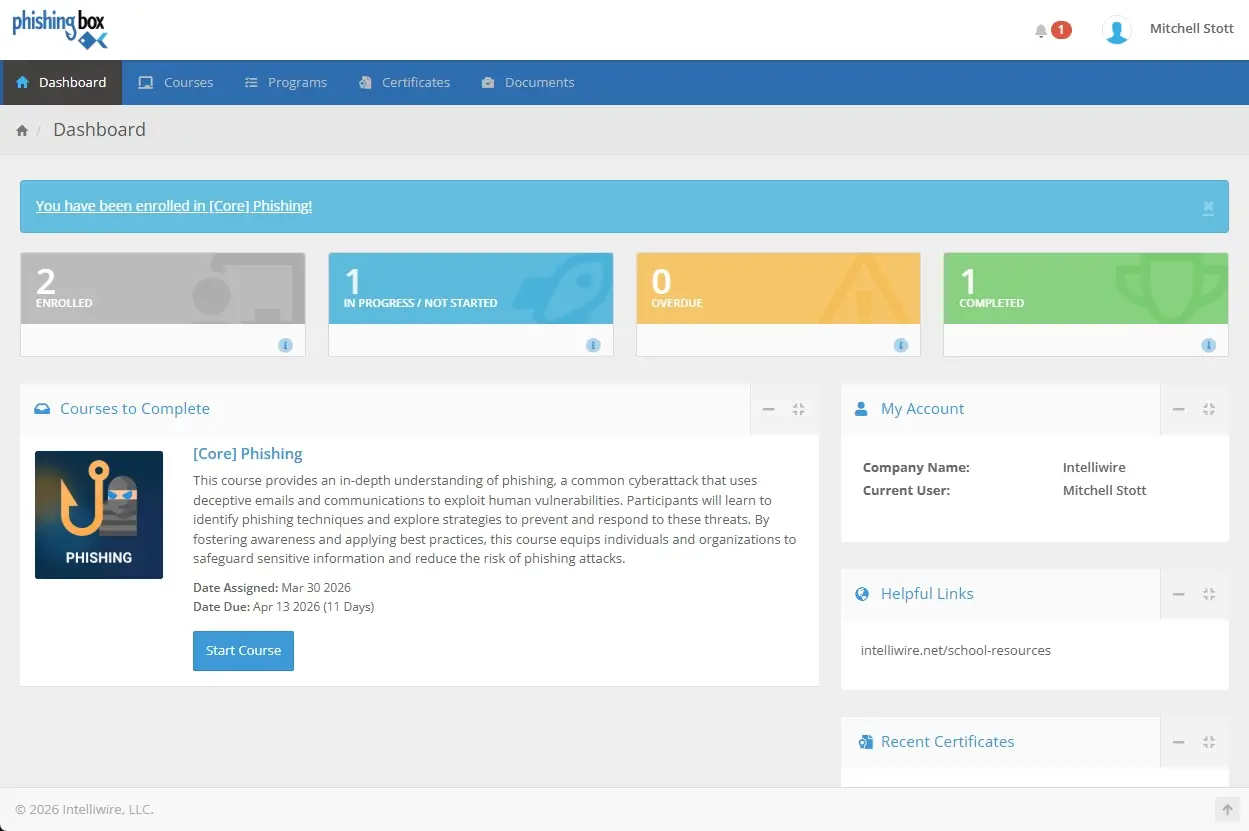
The Learning Management System (LMS) gives teams a built-in way to deliver, manage, and measure cybersecurity training inside PhishingBox. Administrators can assign courses, import supported SCORM packages, build non-SCORM courses, track progress, and document completed training.
Use it as the delivery layer behind cybersecurity training, phishing follow-up, annual awareness assignments, and searchable cybersecurity courses.
Connect LMS user management and synchronization workflows through identity, directory, and HR-aligned integrations.
Import SCORM 2004, 1.2, and 1.1 course packages for assigned security awareness training.
Create course paths with Video Link, Slideshow Link, and PDF content for flexible learning delivery.
Award course certificates at completion so employees and teams can document finished training.
LMS integrations are specifically related to user management and synchronization. Teams can keep learner lists aligned with identity, directory, and HR-driven workflows while the LMS handles assignment and completion tracking.
Teams can combine imported course packages with simpler LMS-native content formats, then connect those assignments to phishing follow-up, scheduled training, and course completion records.
Bring existing SCORM 2004, 1.2, and 1.1 courses into the LMS and assign them alongside PhishingBox training content.
Create simple course experiences with Video Link, Slideshow Link, and PDF learning content when SCORM is not required.
Allow learners to earn certificates at completion and give administrators a clearer record of finished coursework.
Use the LMS to support cybersecurity training programs that need assignment control, learner accountability, and simple proof that training was completed.
Assign baseline cybersecurity courses when employees join and keep onboarding training consistent.
Run recurring cybersecurity training programs with enrollment, reminders, completion tracking, and certificates.
Enroll users into targeted courses after simulation failures so risky behavior turns into measurable remediation.
Give MSPs and partners a repeatable LMS workflow for delivering and tracking client training programs.
Pair PhishingBox content, partner courses, and custom material inside the same learning experience.
Use progress and completion data to support compliance reviews, audits, and management reporting.
Deliver supported SCORM content, non-SCORM courses, cybersecurity training assignments, certificate-eligible learning, and completion reporting from one employee training portal.
Give employees a focused place to complete assigned courses, quizzes, remediation, and certificate-eligible training.
Use PhishingBox cybersecurity courses as part of onboarding, annual training, phishing follow-up, and awareness programs.
Import SCORM 2004, 1.2, and 1.1 packages and manage course delivery from the PhishingBox LMS.
Build non-SCORM courses with Video Link, Slideshow Link, and PDF content for flexible training paths.
Filter users, assign training quickly, and connect failed phishing tests to automated course enrollment.
Track enrollment, progress, completion, overdue assignments, and certificate-eligible coursework.
Use secure token-based access for protected, temporary, or campaign-specific learner workflows.
Supplement PhishingBox content with courses from content providers inside the same training program.
These screenshots show learner dashboards, course views, SCORM modules, video courses, quizzes, and administration screens from the LMS. You can also browse the full School LMS screenshot library.
See how the LMS fits into PhishingBox plans, supported SCORM versions, non-SCORM content, certificates, integrations, and cybersecurity training workflows.
The PhishingBox LMS is included with Pro and Enterprise plans. It is built for teams that want cybersecurity training, phishing follow-up, course tracking, and reporting inside the PhishingBox platform.
PhishingBox supports importing SCORM 2004, SCORM 1.2, and SCORM 1.1 course packages into the LMS.
Yes. Non-SCORM courses can use Video Link, Slideshow Link, and PDF content, giving teams a flexible way to deliver training that does not need a SCORM package.
Yes. Learners can earn certificates when they complete eligible courses, giving employees and administrators a clearer record of completed training.
LMS integrations are focused on user management and synchronization. Teams can connect identity, directory, and HR-aligned workflows to help keep learner enrollment and user data current.
No. Teams can use the PhishingBox LMS or connect phishing simulation workflows to an existing learning management system. Learn more about the phishing simulator.
Yes. PhishingBox includes security awareness training content, and teams can also expand programs with cybersecurity courses, partner content, SCORM packages, and custom course material.
The LMS supports cybersecurity training by helping teams assign courses, automate phishing follow-up, track completions, report progress, and document learning outcomes.
Start a trial or request a demo to review the LMS, cybersecurity courses, phishing follow-up, certificates, reporting, and user synchronization workflows.