
Centralize Reports
Bring suspicious messages from KillPhish and abuse inbox workflows into one triage queue.
Centralize user-reported email threats, manage abuse@yourcompany.com workflows, and streamline phishing investigation and response from one focused workspace.
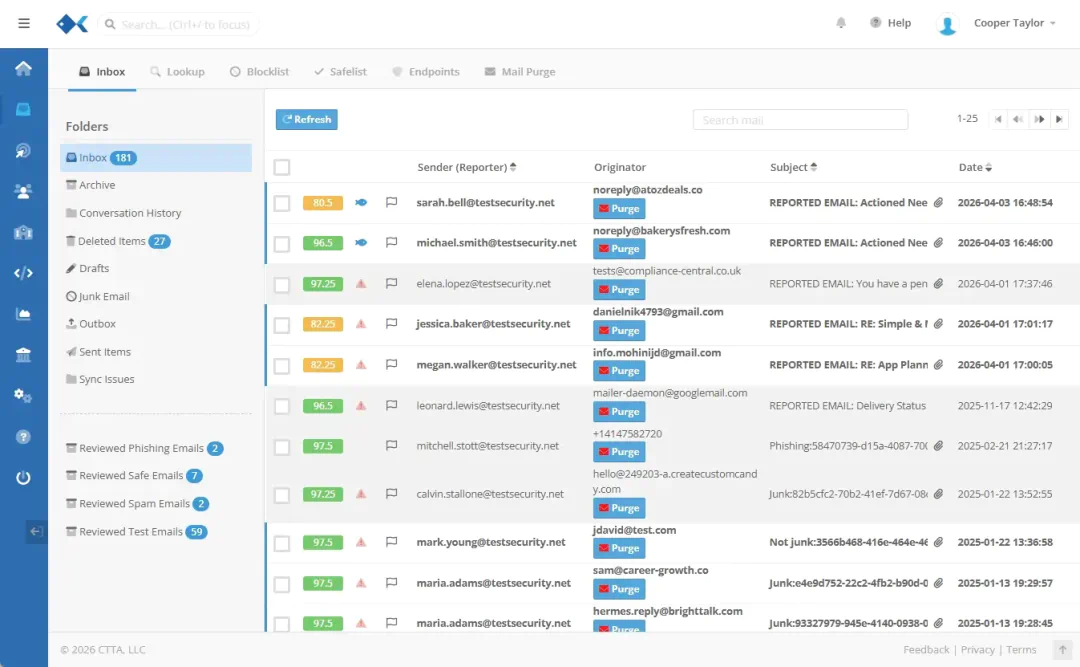
Security Inbox helps teams move from scattered suspicious email reports to a structured phishing investigation queue. It gives security teams a practical phishing reporting SOAR workflow without positioning itself as a full SIEM replacement.
Use it to collect reports from users, review message context, look up indicators, send consistent replies, and hand confirmed threats into remediation or simulation workflows.
Bring suspicious messages from KillPhish and abuse inbox workflows into one triage queue.
Review message details, sender context, domains, links, headers, and lookup data in a focused workspace.
Streamline phishing investigation and response with repeatable steps for triage, reply, and action.
Turn confirmed phishing examples into safe simulations that reflect the attacks users actually see.
Focused views from the Security Inbox workflow. Each card opens larger for quick inspection without loading the full product screenshot up front.
SIEM means Security Information and Event Management. SOAR means Security Orchestration, Automation, and Response. Security Inbox sits in the reported-email workflow where analysts need message context, user reporting, abuse mailbox visibility, and response coordination.
It helps teams automate reported phishing workflows, centralize user-reported email threats, and streamline phishing investigation and response before those findings move into broader security operations.
Explore threat mitigationSecurity Inbox helps teams centralize reported phishing workflows, investigate suspicious messages, and coordinate email threat triage and remediation from a focused workspace.
Review reported phishing emails, search suspicious indicators, and streamline email threat triage and remediation from one queue.
Clone real phishing reports into safe phishing simulations so users can practice against current, relevant attack patterns.
Centralize user-reported email threats from KillPhish and abuse mailbox workflows so security teams can work from a shared inbox.
Support SIEM and SOAR teams with a focused reporting workflow for suspicious emails, investigation context, and response handoffs.
Turn confirmed phishing examples into realistic training and testing opportunities through PhishingBox simulation workflows.
Use inbox, lookup, detail, and indicator views to inspect suspicious messages and move from report to action faster.
See how Security Inbox fits with SIEM and SOAR teams, abuse inbox workflows, KillPhish reporting, and phishing simulation.
Security Inbox is a phishing email triage tool, not a full SIEM replacement. It supports SIEM and SOAR teams by centralizing reported phishing messages, investigation context, and response workflows around the inbox.
Yes. Security Inbox is designed for teams that need a central place to manage reported suspicious messages, abuse mailbox workflows, and phishing investigation queues.
Security Inbox supports SOAR-style workflows for reported email threats, including triage, lookup, review, reply, quarantine-oriented action, and handoff to simulation workflows.
KillPhish gives users a simple way to report suspicious emails. Those reported messages can flow into Security Inbox so security teams can investigate and respond from a centralized workspace.
Yes. Security Inbox can help teams clone reported phishing examples into safe simulations in the Phishing Simulator, helping users learn from realistic threats without preserving harmful content.
Security Inbox is included with PhishingBox platform packages that support phishing simulation and reporting workflows. Contact us to review the right package for your team.