
Spear Phishing Attacks - How? Why?
Learn what spear phishing is, how targeted phishing attacks work, and how cybersecurity awareness training and phishing training help protect employees.
What Is Spear Phishing?
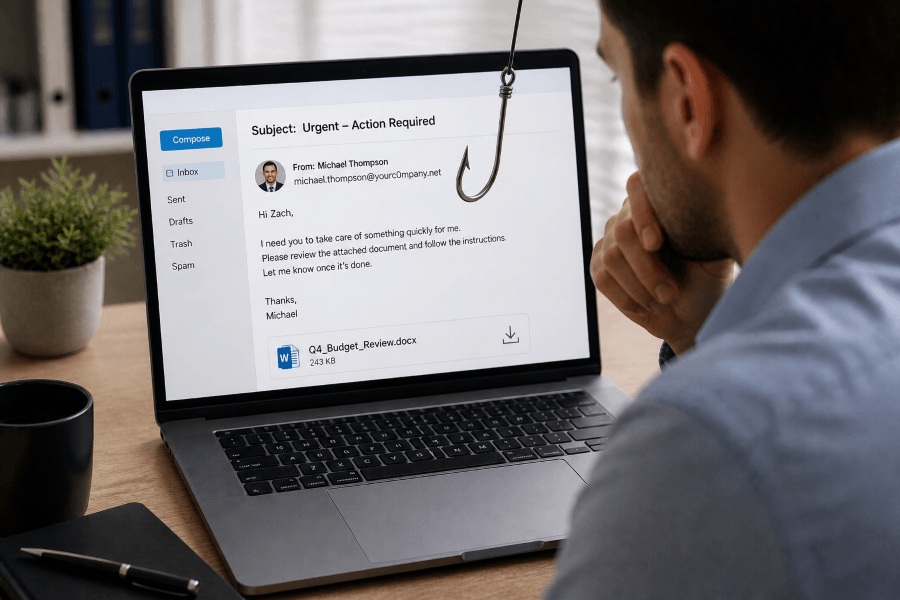
Spear phishing is a targeted phishing attack that uses personalized information to trick a specific individual or group into taking an unsafe action. These attacks often appear to come from a trusted sender, such as a manager, coworker, vendor, financial institution, or business partner.
Common spear phishing goals include:
- Stealing usernames and passwords
- Convincing employees to transfer money
- Tricking users into opening malicious attachments
- Getting access to sensitive business data
- Installing malware or ransomware
- Bypassing normal approval processes
The key difference between phishing and spear phishing is personalization. A generic phishing email may claim that an account needs immediate attention. A spear phishing email may reference the recipient’s job title, manager, department, vendor relationship, recent project, or company process.
How Spear Phishing Works
Spear phishing attacks usually begin with research. Attackers gather information from public websites, social media, data breaches, company directories, press releases, and professional networking platforms. They may look for names, roles, email formats, reporting relationships, vendors, software tools, and business events.
Once the attacker has enough information, they create a convincing message. The email may include a familiar name, urgent request, realistic signature, copied branding, or a link to a fake login page. Some attacks also use text messages, phone calls, QR codes, or collaboration platforms to make the request seem more legitimate.
A typical spear phishing attack may follow these steps:
- Research: The attacker studies the target and organization.
- Impersonation: The attacker pretends to be a trusted person or company.
- Delivery: The message is sent by email, text, phone, or another channel.
- Manipulation: The message creates urgency, fear, curiosity, or pressure.
- Action: The target clicks a link, opens a file, shares credentials, or approves a request.
- Exploitation: The attacker uses the access or information to continue the attack.
Why Spear Phishing Is So Effective
Spear phishing works because it targets people, not just technology. Attackers know that employees are more likely to respond when a request appears to come from someone they trust or when the message matches their daily responsibilities.
Modern spear phishing attacks are also becoming harder to detect. Attackers increasingly use artificial intelligence, phishing kits, compromised accounts, QR codes, and multi-channel tactics to make attacks more convincing. According to Microsoft’s Q1 2026 email threat reporting, email-based threats continue to evolve, with increases in credential phishing, QR code phishing, CAPTCHA-gated phishing, and business email compromise activity.
This is why organizations need more than basic email filters. Technical defenses are important, but employees also need security awareness training that teaches them how to recognize suspicious requests, verify unusual messages, and report potential threats.
Common Spear Phishing Examples
1. Executive Impersonation
An employee receives an urgent email that appears to come from the CEO or another executive. The message asks the employee to buy gift cards, send sensitive files, or complete a wire transfer. The request may claim the executive is in a meeting and cannot talk.
2. Fake Vendor Invoice
A finance employee receives an invoice that appears to come from a known vendor. The invoice may include a new payment account, a malicious attachment, or a link to a fake payment portal.
3. Credential Theft
A user receives a message that appears to come from Microsoft 365, Google Workspace, a payroll provider, or another common business platform. The email links to a fake login page designed to steal credentials.
4. HR or Payroll Scam
An attacker impersonates an employee and asks HR or payroll to change direct deposit information. These attacks often use a friendly tone and may include realistic personal details.
5. QR Code Phishing
Also known as quishing, QR code phishing uses a QR code to send the victim to a malicious website. These attacks may bypass some email security tools because the malicious destination is hidden inside the image.
6. Multi-Channel Social Engineering
Some attackers combine email with phone calls, text messages, or collaboration tools. For example, a user may receive an email about an urgent request, followed by a phone call from someone pretending to confirm the same request.
Warning Signs of a Spear Phishing Email
Spear phishing emails are often polished, but they still tend to include warning signs. Employees should be cautious when they see:
- Unexpected requests involving money, credentials, or sensitive data
- Urgent language that pressures the recipient to act quickly
- Requests to bypass normal procedures
- Attachments or links that were not expected
- Slightly misspelled domains or unusual sender addresses
- Messages that do not match the sender’s normal tone or behavior
- Requests for secrecy or limited communication
- Links that lead to unfamiliar login pages
When in doubt, employees should verify the request using a separate communication channel. For example, call the person directly using a known phone number instead of replying to the suspicious email.
How to Prevent Spear Phishing
Use Cybersecurity Awareness Training
Cybersecurity awareness training helps employees understand how phishing, spear phishing, social engineering, ransomware, and credential theft work. Training should be practical, easy to understand, and relevant to each employee’s role.
Run Phishing Simulations
Phishing simulations allow organizations to test how employees respond to realistic phishing emails in a safe environment. Simulations can help identify risk areas, reinforce training, and measure improvement over time.
Provide Phishing Training After Mistakes
Just-in-time phishing training helps employees learn from mistakes immediately after interacting with a simulated phishing email. This approach turns risky behavior into a learning opportunity.
Require Multi-Factor Authentication
Multi-factor authentication can help protect accounts even if a password is stolen. For high-risk accounts, organizations should consider phishing-resistant authentication methods when possible.
Verify Financial and Sensitive Requests
Organizations should require out-of-band verification for wire transfers, bank account changes, payroll updates, credential requests, and sensitive data sharing.
Use Email Authentication and Security Controls
Technical controls such as SPF, DKIM, DMARC, secure email gateways, attachment scanning, and link protection can help reduce phishing risk. However, these controls should be combined with employee training because no filter catches every attack.
Make Reporting Easy
Employees should know how to report suspicious emails quickly. A simple reporting process helps security teams respond faster and reinforces a culture of awareness.
How PhishingBox Helps Organizations Defend Against Spear Phishing
PhishingBox helps organizations reduce human risk through phishing simulation, phishing training, and cybersecurity awareness training. The platform gives security teams the tools to educate employees, test behavior, and measure progress over time.
With PhishingBox, organizations can:
- Run realistic phishing simulations
- Deliver targeted phishing training
- Assign cybersecurity awareness courses
- Provide just-in-time training after failed simulations
- Track employee risk and training progress
- Support ongoing security awareness programs
Final Thoughts
Spear phishing continues to be a major threat because it is personal, convincing, and constantly evolving. Attackers use research, impersonation, urgency, and increasingly sophisticated tools to target employees and organizations.
The best defense is a layered approach that combines email security, strong authentication, verification procedures, phishing simulations, and ongoing cybersecurity awareness training. When employees know what to look for and how to respond, they become a stronger line of defense against targeted phishing attacks.
Frequently Asked Questions About Spear Phishing
What is spear phishing?
Spear phishing is a targeted phishing attack that uses personal or organizational details to make a message more convincing.
What is the difference between phishing and spear phishing?
Phishing is often broad and generic, while spear phishing is targeted and personalized for a specific person, role, or organization.
What is an example of spear phishing?
A common example is an attacker impersonating a company executive and asking an employee to transfer money, send sensitive data, or click a malicious link.
How can employees prevent spear phishing?
Employees can prevent spear phishing by checking sender addresses, avoiding unexpected links and attachments, verifying unusual requests, and reporting suspicious messages.
Why is phishing training important?
Phishing training helps employees recognize social engineering tactics, avoid unsafe actions, and respond properly when they receive suspicious messages.