
Sender mismatch
The display name looks trusted, but the actual address, reply-to path, or domain does not match the organization.
A phishing email is a deceptive, AI-polished message that pretends to come from a trusted person, brand, or system so you reveal sensitive information, approve a request, or download something malicious.
Understand what a phishing email is by reviewing realistic examples, the warning signs they contain, and the steps users should take before they click, reply, download, or report.
A phishing email is a type of online scam where attackers impersonate legitimate organizations, coworkers, executives, vendors, banks, government agencies, or popular websites to steal passwords, payment details, personal data, files, or account access.
The message often uses urgency, fear, authority, curiosity, or a reward to make the recipient act quickly. With AI, those lures can be cleaner, more personalized, and easier to scale, so the best defense is context checking and independent verification.
Reference the glossary definitionModern phishing emails are not always full of spelling mistakes. Look at the request, the destination, the sender, and the pressure behind the message.
The display name looks trusted, but the actual address, reply-to path, or domain does not match the organization.
Buttons or shortened URLs point somewhere unexpected, misspelled, newly registered, or unrelated to the claimed sender.
The email warns that an account, payment, delivery, tax return, or security setting needs immediate attention.
Invoices, shared files, forms, or document previews arrive without context or ask you to enable macros, sign in, or download.
The message asks you to log in, verify MFA, reset a password, approve a push prompt, or enter a one-time code.
The wording may be clean and personalized, but the request still feels unusual, rushed, or outside the normal process.
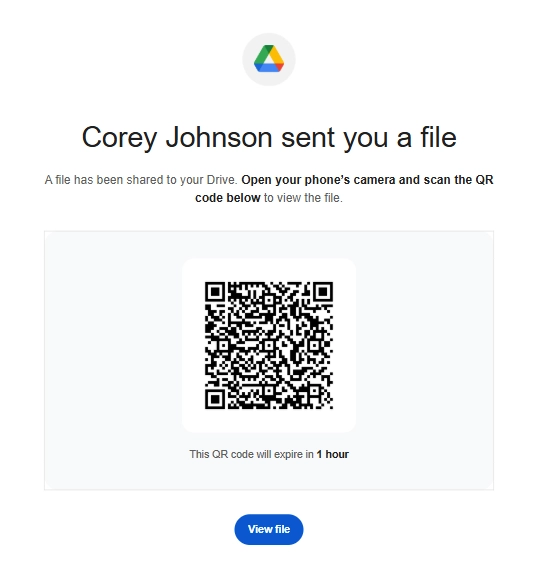
Analyze real phishing email examples and learn to spot suspicious indicators. Select a thumbnail to view the full email.
A shared-file lure pushes the recipient away from the inbox and onto a phone where email security controls may have less visibility.
When a message feels suspicious, the safest move is to slow down the workflow before the attacker gets the action they want.
Look past the display name. Check the full address, reply-to value, domain spelling, signature, and whether the request fits how that sender normally communicates.
Hover before clicking, compare the destination to the claimed brand, and be cautious with shortened links, QR codes, redirects, and login prompts.
Ask whether the email uses fear, urgency, secrecy, authority, payment pressure, account risk, or a reward to rush you into acting.
Use a known website, trusted app, saved phone number, internal directory, or separate communication channel. Do not verify through the suspicious email itself.
Don't Click! Go Direct! If an email asks you to sign in, pay, download, approve, scan, or share sensitive information, leave the message and go directly to the trusted service or person. If it still looks suspicious, report the phishing attempt.
Use this guide for the definition and examples, then connect employees to simulation, reporting, and training workflows.
Run realistic phishing simulations, measure clicks and reports, and test employees safely.
Explore SimulatorGive users a clear path to report suspicious messages so security teams can respond faster.
Report PhishingReinforce safer habits with training moments, courses, and follow-up content after risky actions.
View TrainingQuick answers about phishing email meaning, AI changes, reporting, simulation, and training.
A phishing email is a deceptive message that impersonates a trusted person, brand, system, or workflow to trick a recipient into clicking, replying, opening a file, entering credentials, sending money, or downloading malware.
AI can make phishing emails cleaner, more personal, easier to translate, and faster to produce. That means users should look beyond spelling mistakes and focus on context, sender signals, links, requests, and verification.
They should pause, avoid clicking, inspect the sender and request, verify through a trusted path, and report the message using the organization-approved reporting process.
A phishing simulator lets teams safely test realistic lures, while phishing training reinforces reporting and verification habits.