ClickFix / Fake CAPTCHA Social Engineering: Attack Mechanics, Case Studies, and Mitigation with PhishingBox
Learn how ClickFix and fake CAPTCHA attacks use social engineering to trick users into running malicious commands, and how organizations can defend with training, simulation, and layered controls.
Executive Summary
Recent high-profile campaigns have weaponized social engineering to turn
user trust into attack vectors. Techniques like ClickFix and fake CAPTCHA
pages trick victims into copying and running malicious commands, effectively handing
attackers direct access to systems. In the past 18 months, cybercriminals and state-backed
groups have deployed these lures across email, web ads, and compromised sites, repeatedly
compromising sensitive targets despite strong technical defenses.
This report explains how these attacks work and why they succeed, reviews documented cases
from NGO spearphishing to global phishing-as-a-service operations, maps the attack flow to
MITRE ATT&CK, and outlines the detection challenges security teams face. It also shows
how human-centric defenses like phishing simulations, awareness training,
and measurable risk reduction can blunt these threats.
Background and Definitions
ClickFix and fake CAPTCHA schemes are social-engineered copy-and-paste
attacks first observed in late 2023. Unlike malware that silently exploits a
system, these attacks rely on user action to run malicious code. Victims
are shown a plausible dialog or webpage, such as a browser verification prompt or fake error
message, and are instructed to open the Run box or terminal and paste a command to "fix" an
issue or "prove" they are human. In reality, the copied command downloads and executes
malware.
ClickFix commonly refers to prompts such as fake browser updates or CAPTCHA
pages that manipulate the clipboard. Common lures include bogus Chrome or Discord error
screens, fake Cloudflare CAPTCHA checks, or even Blue Screen of Death replicas. A related
variation known as FileFix shifts the same trick into Windows File Explorer
by instructing users to paste commands into the address bar.
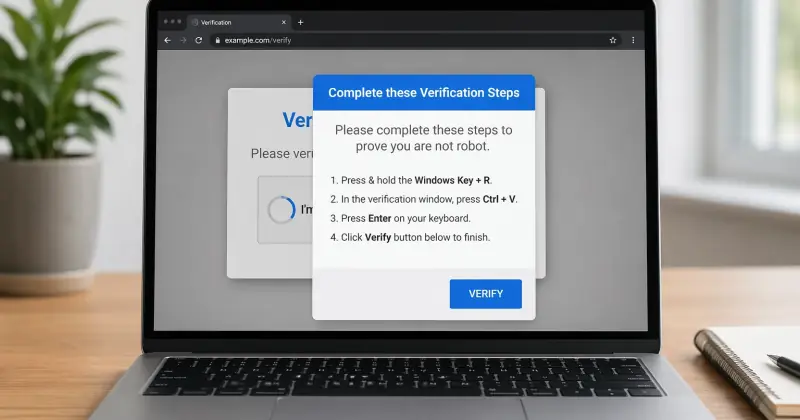
Fake CAPTCHA attacks abuse the familiarity and ubiquity of CAPTCHA
interfaces. Users see a convincing "I'm not a robot" page, often styled like Cloudflare or
Google, and are told to copy a "verification token" from their clipboard. In reality, that
token is a hidden malicious command. These tactics bypass many traditional defenses because
the user manually executes the code, which can evade email filtering, antivirus detection,
and signature-based controls.
Recent Incidents and Timeline
ClickFix and fake CAPTCHA campaigns have spread across government, NGOs, enterprises, and
consumer targets. The incidents below show how attackers package the same core copy-and-run
tactic into timely, believable lures that persuade users to execute malicious code
themselves.
Notable incidents and campaigns in the last 24 months
Date
Target / Industry
Attack Vector
Impact
Source(s)
Nov 2024
Global finance, health, and government
Phishing email impersonating Microsoft, with instructions to run PowerShell
under the guise of a Patch Tuesday update
Installed legitimate RMM tooling for espionage
The Hacker News
Sep 2024
Worldwide developers and SMEs
GitHub-themed phishing with a fake GitHub site, reCAPTCHA UI, and
copy-and-run instructions
Lumma Stealer deployed across roughly 300 organizations
Proofpoint
Sep 2024
Swiss e-commerce and logistics
Ricardo-themed phishing campaign leading to a fake CAPTCHA page
Suspected AsyncRAT / PureLog delivery
Proofpoint
Sep 5, 2024
Global organizations
Email-based “security update” lure instructing users to copy and paste
PowerShell
NetSupport RAT deployment
Proofpoint
Jan–Mar 2025
Asia-focused think tanks
Meeting-request phishing that led to a fake Japanese embassy page and
PowerShell execution
Quasar RAT deployed via scheduled tasks
The Hacker News
Mar 2025
NGOs and international organizations
Malvertising drive-by to a fake Turnstile / CAPTCHA page
Lumma Stealer delivered through HTML and PowerShell
Microsoft
Oct 8, 2025
Ukrainian relief NGOs and government
Spearphishing with a PDF leading to a Zoom-like site and fake Cloudflare
CAPTCHA that instructed victims to run a copied token
WebSocket RAT remote shell installation
SentinelOne Labs
Nov 17, 2025
Global multi-sector targets
Email phishing leading to a fake CAPTCHA landing page
Amatera Stealer and NetSupport RAT
The Hacker News
Throughout 2025
Multiple sectors
Mixed phishing and compromised-site campaigns leading into ClickFix lures
Lumma, Rhadamanthys, XWorm, Quasar, and other malware families
Trend Micro, Push Security
In these campaigns, the core “run / paste” workflow remains consistent: the
victim is instructed to open Run, PowerShell, Terminal, or File Explorer, paste a
supplied command, and execute it.
Attack Chain and Technical Mechanics
How ClickFix turns social engineering into code execution
The typical ClickFix or fake CAPTCHA campaign blends classic phishing delivery with a
copy-and-paste social engineering step. An initial phishing email or malvertising lure sends
the victim to a fake verification page. That page then copies or displays a malicious
command and instructs the user to open the Run dialog, terminal, or another native system
tool and execute it.
The final stage usually launches PowerShell, mshta, or
another script interpreter to fetch and run the payload in memory. This can give the
attacker initial access without dropping a conventional executable to disk, making the
activity harder to detect with file-based defenses.
MITRE ATT&CK mapping
The attack chain commonly maps to phishing delivery, user execution, and scripting
interpreter activity. The most important techniques include spearphishing,
drive-by delivery, User Execution, and Command and
Scripting Interpreter behavior involving PowerShell or mshta. Because the
payload often runs in memory, defenders typically need to focus on process behavior and
execution patterns rather than file hashes alone.
Psychological Tactics and Why These Attacks Work
Familiar interfaces lower suspicion
ClickFix exploits trust, familiarity, and cognitive shortcuts. By using interfaces that look
like CAPTCHA checks, browser updates, Zoom pages, or other routine prompts, attackers reduce
the chance that a victim will question the interaction. The task feels simple, safe, and
procedural rather than dangerous.
The persuasion techniques behind fake CAPTCHA lures
Authority and legitimacy: The page appears to come from a known brand,
browser, or security service.
Urgency and momentum: Users are nudged to act quickly so they keep
moving through the workflow.
Low-friction compliance: Copying and pasting a command feels like a
harmless troubleshooting step.
Trust in internet norms: CAPTCHAs are common enough that users rarely
stop to question them.
The result is a campaign that does not need a software exploit. It only needs a believable
interface and a distracted user.
Detection Challenges and SOC Indicators
Why traditional controls often miss ClickFix
These attacks are designed to evade detection. Since the user manually executes the malicious
command, there may be no suspicious file attachment or obvious malware download for
automated tools to flag in advance. Email security may only see a link, web filters may only
see a normal HTTPS page, and endpoint tools may not alert until PowerShell, mshta, or
another interpreter is already active.
What security teams should watch for
Unusual web navigation: Visits to short-lived or suspicious domains
hosting fake CAPTCHA pages.
Clipboard and command activity: User-triggered PowerShell or console
activity tied to web browsing.
Hidden-window execution: Processes launched with hidden parameters or
in-memory execution patterns.
Phishing anomalies: Emails using unusual calls to action such as “fix,”
“verify,” or “run this command.”
Cross-channel correlation: Related activity across email, ads,
messaging apps, and social platforms.
Even with strong monitoring, these indicators are often reactive. That is why prevention at
the human layer matters so much for this threat family.
Mitigation and Controls
Human-centric controls with PhishingBox
The most effective defense against ClickFix is training and simulation.
Organizations need users to recognize that no legitimate site should ever ask them to open
Run, paste a command, and execute it as part of a CAPTCHA or verification flow.
PhishingBox directly supports that defense by enabling organizations to simulate realistic
fake CAPTCHA lures, deliver contextual training after failures, and measure improvement over
time. Security teams can track metrics such as Phish-Prone Percentage,
Report Rate, and Time-to-Report to evaluate whether risky
behavior is decreasing.
Practical simulation and reinforcement ideas
Simulation: Send a realistic message that leads to a fake CAPTCHA or
“security check” page.
Just-in-time training: Enroll clickers in immediate follow-up training
on ClickFix and copy-and-run scams.
Retesting: Repeat the scenario later with a new pretext to reinforce
recognition.
Quarterly drills: Rotate in variations like fake browser errors, update
prompts, or file-based lures.
Recommended policies and technical controls
Restrict PowerShell, mshta, and other script interpreters where possible.
Disable or limit Run dialog access in environments where it is not needed.
Tune EDR to flag hidden-window execution and encoded command activity.
Use browser protections that reduce silent clipboard abuse.
Block known malicious domains and suspicious file-hosting destinations.
Adopt and reinforce a clear policy: legitimate websites do not ask users to paste
commands into system tools.
Executive Recommendations and Prioritized Actions
What organizations should do next
Run continuous simulations that include ClickFix and fake CAPTCHA
scenarios.
Deliver targeted awareness training focused on copy-and-run social
engineering tactics.
Strengthen reporting culture so suspicious prompts are escalated
quickly.
Harden script execution controls on Windows and other endpoints.
Improve detection logic for unusual command execution tied to browser
activity.
Brief leadership on why these attacks succeed through human
manipulation rather than software exploits.
Extend awareness to partners and suppliers to reduce third-party
exposure.
ClickFix shows that attackers do not always need zero-days or malware exploits to succeed.
Often, they only need a convincing page and a user willing to follow instructions. Reducing
that risk requires layered controls, but it starts with helping users recognize the trap
before they act.